
Why Do PLCs and HMIs Use Static IP Addresses?

15th November, 2026.
In this post, we will see the concept of static IP addresses and their importance in industrial automation.
When configuring Ethernet communication in an industrial
automation system, assigning IP addresses to PLCs, HMIs, SCADA PCs and other
network devices is one of the basic commissioning activities. One common
practice in industrial automation is to assign static IP addresses to these
devices rather than allowing them to obtain IP addresses automatically through
DHCP (Dynamic Host Configuration Protocol). But why is this necessary? What
happens if a PLC receives a different IP address after restarting? Can an HMI
continue communicating with a PLC if its IP address changes? And why do
industrial networks generally prefer fixed IP addressing?
Let's understand the practical reasons behind this approach.
· What is static IP address?
Static IP addresses are IP addresses that are manually
assigned to network devices. These IP addresses will remain the same, unless
changed by the network engineer or administrator. As an example, assume we have
set up the following IP addressing in an industrial machine.
1.
PLC = 192.168.1.10
2.
HMI = 192.168.1.20
3.
SCADA PC = 192.168.1.30
4.
Switch (management) = 192.168.1.40
Each device will have a pre-set IP address so it can be recorded in network documentation. If this machine is then turned off and turned back on, the devices will still have the same IP addresses as previously assigned. Therefore, the communications in this network can be anticipated. This makes setting up, troubleshooting and maintenance in this network much simpler.
· What is dynamic IP address?
Dynamic IP addresses are automatically assigned by a Dynamic Host Configuration Protocol (DHCP) server. Rather than manually assigning an IP address to a network device, the device will request an IP address from the DHCP server. The DHCP server will assign an available IP address to the device. Along with this, the device will be assigned other network information. This includes subnet mask, default gateway and DNS server IP addresses. As an example, a SCADA PC may be assigned 192.168.1.30. However, once the lease has expired or depending on networking conditions, the device could be assigned a different IP address. For example, 192.168.1.45. This is fine in environments such as offices, laptops and mobiles. However, in industrial automation systems, it can cause issues as other devices rely on fixed communication addresses.
· Where Is the DHCP Server Located?
A DHCP server is a device or service on the network that automatically assigns IP addresses and other network settings (such as subnet mask, default gateway and DNS server address) to connected devices. In an industrial network, the DHCP server can be located in different places:
1. Industrial or office router: Many routers have a built-in DHCP server that assigns IP addresses to connected devices.
2. Layer 3 switch: Some managed Layer 3 switches support DHCP server functionality.
3. Windows Server: In larger industrial networks, a central Windows Server may provide DHCP services.
4. Dedicated network appliance: Some organizations use a dedicated DHCP server or network management appliance.
For example, if a PLC and HMI are connected to the same
industrial Ethernet network, the router or a Windows Server connected to that
network may assign their IP addresses automatically.
Important: A normal unmanaged Ethernet switch does not assign IP addresses. It simply forwards Ethernet traffic. If DHCP is required, a DHCP server must be available on the network, either directly or through a DHCP relay. For a PLC programmer, the practical point is that DHCP is not a function of the PLC or HMI itself. It is a network service provided by another device or server.
· Why static IP addresses are preferable?
Fixed IP addresses in PLC networks allow for:
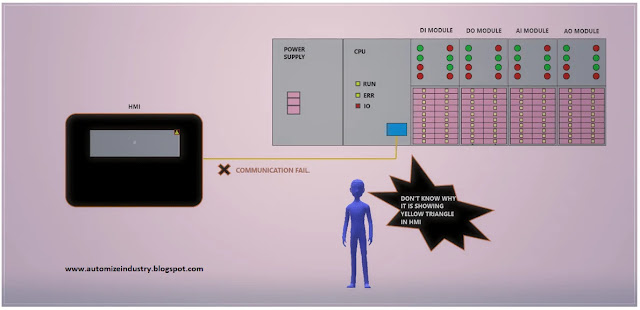
1. Consistent Communication - Assume the HMI is set up to connect to a PLC with an IP address of 192.168.1.10. However, if the PLC has a dynamically assigned IP address and it reboots it may now have an IP address of 192.168.1.25. The HMI will attempt to connect to the PLC at 192.168.1.10. As the PLC is now at 192.168.1.25, communication will fail and will only resume once the correct configuration is made. By having fixed IP addresses, this issue can be avoided. This can be particularly important in PLC to HMI communication, PLC to PLC communication and SCADA connections.
2. Avoid Communication Conflicts - Multiple devices may be in communication with each other in an industrial network. For example, multiple PLC’s may be in communication with the HMI. A SCADA application may be collecting data from multiple controllers. If unexpected changes to network IP addresses occur, communication may be sent to incorrect devices. By using fixed IP addresses, it is easier to ensure each device has a unique IP address and has been documented. This also avoids unexpected IP address changes due to dynamic IP assignment.
3.
Easier Commissioning - On commissioning a
machine, automation engineers will often provide an IP address list for all
devices in the network. For example,
a)
PLC 1 = 192.168.1.10
b)
PLC 2 = 192.168.1.11
c)
PLC 3 = 192.168.1.12
d)
HMI 1 = 192.168.1.20
e)
HMI 2 = 192.168.1.21
f)
SCADA PC = 192.168.1.30
This makes it easier to set up device communication and
confirm connectivity in the network. Devices can also be easily identified
based on their IP address. If dynamic IP addresses are used in this situation,
without appropriate reserved IP address allocations, IP addresses may change.
This means extra configuration will be required.
4. Easier troubleshooting and maintenance - If maintenance is being carried out on a machine and the HMI cannot connect to the PLC, a technician can easily investigate if a fixed IP address has been assigned. They can check the network settings, perform a ping and confirm communication. However, if IP addresses are dynamic, the technician may need to check what IP address has been assigned to the PLC by the DHCP server in order to troubleshoot. This can make troubleshooting slightly more complex. By using fixed IP addresses, it is easier to document IP addresses in the network. Also, devices can be easily identified during maintenance.
5. Better control of network design - There are many devices in industrial networks including PLCs, HMI’s, remote I/O’s, managed switches, drives, industrial PCs and SCADA servers. Each device may have specific communication requirements. For example, a PLC may be communicating with multiple remote I/O devices. Or a SCADA PC may be communicating with multiple PLCs. Having fixed IP addresses enables engineers to design the network more systematically. It also ensures that IP addresses across the network are consistent. Also, fixed IP addresses help reduce the risk of device IP addresses changing unintentionally during normal maintenance of the network.
· What happens if a PLC uses dynamic IP addressing?
Although a PLC may be assigned dynamic IP addresses, this doesn’t necessarily mean that the IP address will change every time it reboots. A DHCP server will generally assign IP addresses with a lease time. Depending on how it has been set up and depending on IP address availability, it may assign the same IP address. However, it is possible that a different IP address is still assigned. A PLC may initially be assigned 192.168.1.10. The HMI is set up to connect to that IP. However, if the PLC is disconnected from the network for a long period of time, it’s lease may expire. Therefore, this IP address may be assigned to a different device in the network. Once connected, the PLC may be given a new IP address of 192.168.1.35. However, the HMI is still trying to connect to 192.168.1.10. Depending on the situation, communication may fail. In some situations, it’s even possible that it may be communicating with a different device. Due to this, dynamic IP addressing without control is generally not recommended on crucial industrial equipment.
· Can dynamic IP addresses be used in industrial automation?
Yes. As long as it is correctly designed and managed, it can work well in industrial networks. A common method is using IP address reservations. This means that the DHCP server is configured to assign a specific IP address to a specific device in the network, based on the MAC address. In this example, PLC MAC address can be added to the DHCP server. The IP address 192.168.1.10 can be reserved for this PLC. Whenever the PLC requests an IP address, it will be given the reserved IP address. This means that IP addresses are centrally managed, but predictable IP addresses are also given. However, it should still be noted that the PLC relies on DHCP services. How it behaves during downtime of the DHCP service will depend on the device and how it handles DHCP. Within critical automation networks, engineers must carefully consider whether it is more appropriate to use IP address reservations with DHCP, or static IP addresses.
· What should be considered when assigning static IP addresses?
When assigning IP addresses to industrial devices, the
following points should be considered.
a)
Ensure an IP addressing plan is given. Decide on
IP ranges for PLCs, HMIs, SCADA PCs, remote I/O’s and any other devices in the
network.
b)
Do not give duplicate IP addresses. Ensure all
devices have a unique IP address in the network.
c)
Discuss with IT team to ensure that manual IP
address allocations do not conflict with DHCP IP address ranges, or IP address
allocations for other devices.
d)
Document network. Note IP address, subnet mask,
gateway and device ID in order to assist in future maintenance.
e)
Consider Network Segmentation. If there are
multiple machines/areas in the plant, consider creating different
subnets/VLAN’s.
f) Check device communications. Once IP addresses have been allocated, check communication between PLC, HMI, SCADA PC and other devices.
· Disadvantages of Static IP Addressing
Although static IP addressing is suitable for most critical
devices in industrial automation, care must be taken in managing them. Problems
may occur with static IP addresses. These include:
1.
Manual IP assignments - Each device must be
manually assigned parameters.
2.
Duplicate IP Addresses - If planning has not been
carried out correctly, devices may be given duplicate IP addresses.
3.
Scaling up the network - When adding new devices,
current IP address allocations must be checked.
4.
Documentation - IP address documentation must be
updated in line with network changes.
However, these problems may be overcome with good network planning and documentation.
· Where is Dynamic IP addressing preferred?
Dynamic IP addressing is generally preferred in systems with
constantly connecting/disconnecting or moving devices. Static IP addressing is
generally preferred in fixed infrastructure devices to allow consistent
communication with other devices. Preferred in:
1.
Office Networks - As there are often many
devices connecting and disconnecting from office networks (laptops, computers
and mobile devices), dynamic IP addressing allows each device to be assigned an
IP address from the available pool. This means that IT staff do not have to
manually assign IP addresses to devices.
2.
Wi-Fi - As mobile devices, tablets, laptops and
guest devices connect to various Wi-Fi networks, dynamic IP addressing allows
for devices to gain the correct IP addresses easily.
3.
Guest/public networks - Hotels, airports,
schools and general public WIFI’s can have hundreds or even thousands of
temporary users. As such, manually assigning IP addresses to all devices would
be inefficient.
4.
Temporary engineering devices - Engineering
laptops used to programme PLCs, configure HMIs, and commission/ diagnose
problems can be given dynamic IP addresses in office networks or temporary
engineering networks.
5. Large networks with changing devices - In warehouses, schools or other environments with many devices used by users, dynamic IP addressing can be used to centrally allocate IP addresses. This reduces manual configuration.
· Differences between dynamic and static IP addressing:
1.
Static IP Addresses - A static IP address is
manually assigned to a device by engineers/network administrators. It will
remain at this IP address until manually changed.
2. Dynamic IP Addresses - IP addresses are automatically assigned from the pool of available IP addresses within a server. Generally, they are assigned for a set amount of time (lease). Depending on server settings and network conditions, the IP address can either be renewed, or changed.
· Advantages of dynamic IP addressing
1.
Fewer manual configurations.
2.
IP addresses are efficiently reused - As devices
disconnect, expired IP addresses can be reused.
3.
Centrally managed - From the DHCP server you can
manage IP addresses, subnets, gateway and DNS settings.
4.
Scales easily - More devices can be added to the
network without having to manually assign IP addresses.
5. Devices can be moved easily - If a device connects to a different network, it will automatically gain correct device settings.
· Advantages of static IP addressing
1.
Consistent communication - Devices can
consistently communicate with other devices.
2.
Easier to configure HMI to PLC - The HMI can be
set up with a static IP address for the PLC without needing reservations or
discovery from DHCP.
3.
Easier troubleshooting - Devices can be
identified in the network using documented IP addresses.
4.
Improved network planning - With static IP
addresses it is easier to manage PLC’s, HMI’s, SCADA servers, drives and other
devices in the network.
5. Good for fixed infrastructure - As devices provide consistent services, they can be assigned static IP addresses.
· Example in industrial automation
Consider there are 20 PLCs, 15 HMI’s, 2 SCADA servers and 5
engineering laptops in a manufacturing site. PLC’s, HMI’s and SCADA servers are
fixed devices, therefore generally have static IP addresses. As it is essential
that other devices communicate with them reliably, static IP addresses are
appropriate.
However, engineering laptops can be used by different
engineers and may be connected to different networks. Therefore, using dynamic
IP addressing for these devices is more convenient, as it will automatically
assign correct device settings.
It should be noted however, that dynamic IP addressing does
not necessarily mean that a device will be given a new IP address each time it
reboots. Depending on server settings, a device can be given the same IP
address (renewed) or using a reservation, a specific device can be given a
specific IP address every time.
In industrial automation, static IP addressing is often
preferred in order to ensure predictable communication between PLC’s, HMI’s,
SCADA PC’s and other devices. If devices in communication rely on pre-set IP
addresses, unexpected changes to IP addresses may cause communication issues.
This could lead to increased time spent troubleshooting. Although it is
possible to use dynamic IP addressing in industrial automation with care, it is
often simple and common practice to assign static IP addresses manually to
critical automation devices. From a PLC programmer perspective, it is very
important that all devices in the network have predictable identities, valid
communications and that maintenance of the network is simple.
Thank you for reading the post. I hope you liked it and will find a new way in this type of technology.

Comments
Post a Comment
If you have any queries, please let me know